Support Appointment Form
Please fill out the following information so we can provide you with timely phone support.



Remote View video on Mobile app RXCamView
1. Download “RXCamView” on your mobile phone from Apple App Store or Google play.
RXCamView
2. Please scan the QR code on the top cover of the NVR box. If you cannot find QR code on the NVR, please go to the NVR monitor. Move mouse to the bottom, click on  on bottom left--> Setup--> System--> Information to get QR code of your device.
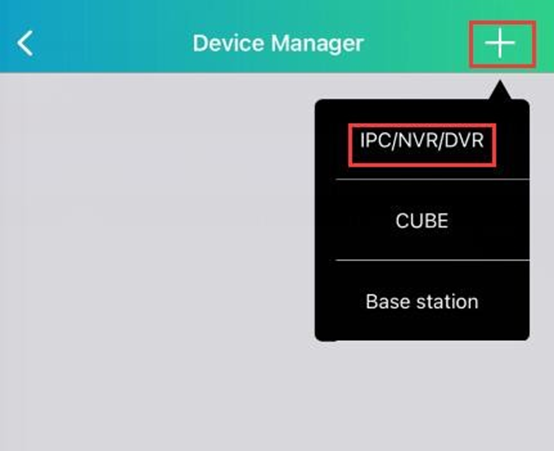
3.Open RXCamView, allow Privacy Policy, click + on top right to add device. Choose IPC/NVR/DVR
4.Scan the QR code.
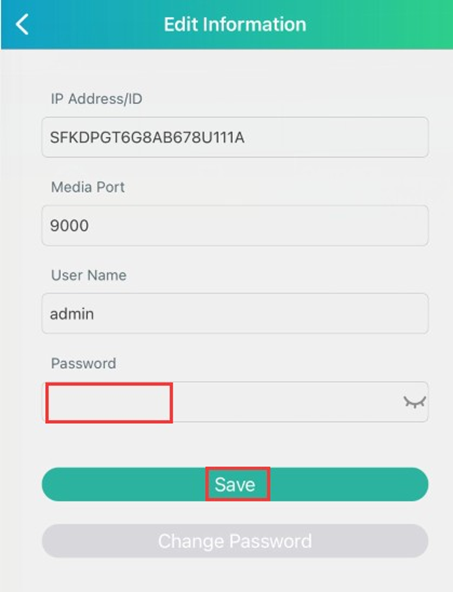
5.Enter the password you set for the system, click on Save to save device.
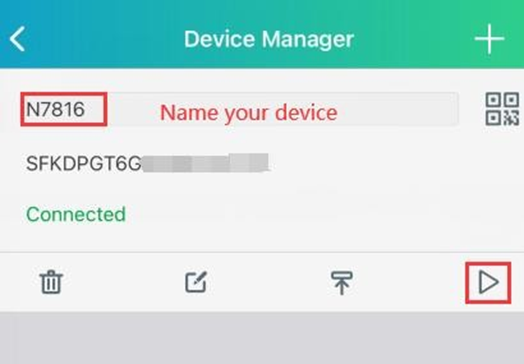
6. Name your device and click on  to view live video.
7. Tap one camera and click  on bottom to enable audio. Tap on one camera, click
  on the camera image to talk with camera. Please hold the
  while talking.
8. Click  on the bottom to playback video.
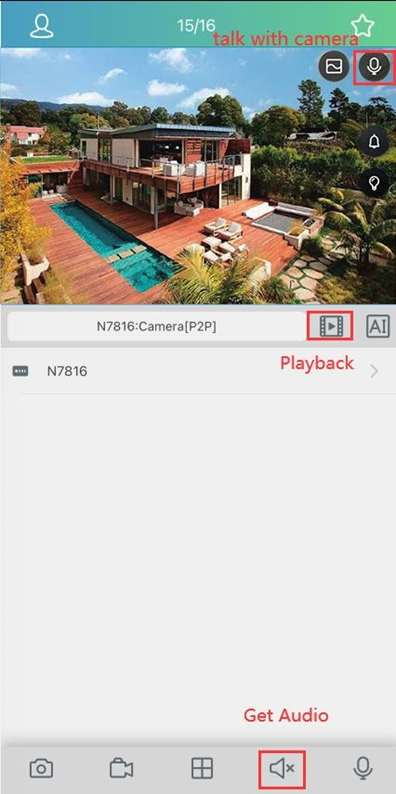
9. Select one channel and rotate the phone to horizontal orientation to view video in full screen (Turn off the portrait orientation lock of your phone.).
 -->-->-->